
Headless CMS vs WordPress for B2B Marketing Sites: How to Choose
The headless CMS vs WordPress question usually comes up when a marketing site feels slow to change. Developers suggest going headless, marketing worries about losing control and nobody is sure what the switch will really cost.
This guide explains what headless means in plain words, when WordPress is enough, when headless makes sense, the hidden costs and what matters for AI crawlers. It ends with a six-question decision tree.
Short answer: WordPress is enough for most B2B marketing sites with a small team and a few hundred pages. Headless makes sense when you publish to several front ends, need many languages at scale or have developers who will own the site long term. For AI search, the CMS matters less than whether the server sends complete HTML.
What “headless” means in plain words
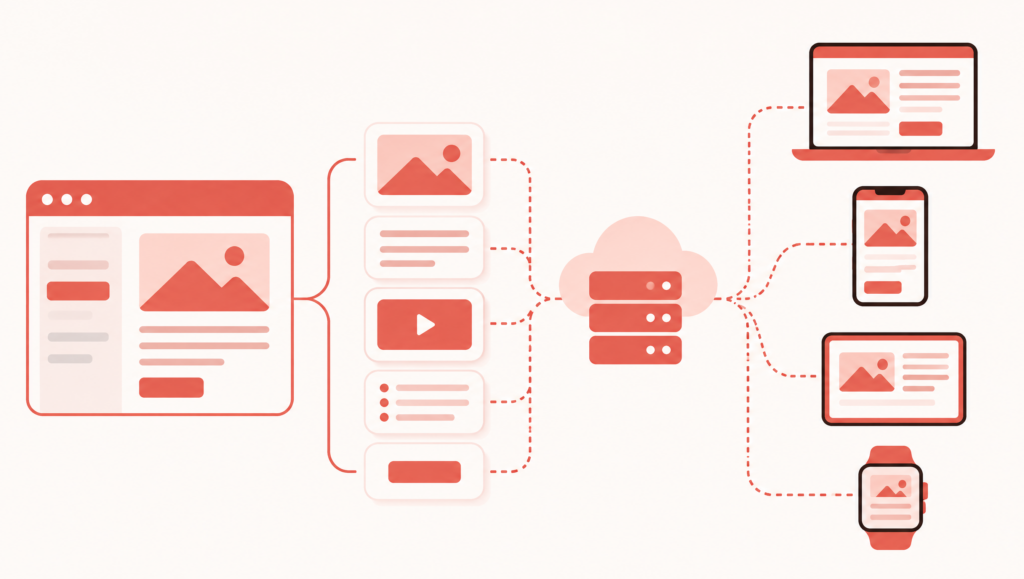
A traditional CMS like WordPress stores content and also builds the pages people see. A headless CMS only stores content. Developers then build a separate front end, often with a framework like Next.js, that pulls the content through an API.
| Part | Traditional WordPress | Headless setup |
|---|---|---|
| Content editing | WordPress admin | Headless CMS admin |
| Page building | Theme and blocks in WordPress | Custom front end built by developers |
| Hosting | One system | Usually two or more systems |
| Who changes layouts | Marketing, within the theme | Mostly developers |
WordPress can also run headless, which adds one more option to the table.
When WordPress is enough
WordPress is still the most used CMS by far. According to W3Techs data reported by Search Engine Journal, it held a 57.9% share of sites with a known CMS in November 2026, down from its peak but far ahead of the rest. As a result, hiring, plugins and documentation are easy to find.
- Your team is mostly marketers with little developer time.
- You have a few hundred pages, not tens of thousands.
- You publish mainly to one website.
- You need SEO plugins, forms and previews without custom work.
When headless makes sense
- You publish the same content to a website, an app and a help center.
- You run many languages or regions with shared content models.
- Your product team already uses a modern front-end framework and can own the site.
- You need strict performance or security control that a theme cannot give.
In short, headless solves problems of scale and reuse. It does not solve unclear messaging or slow approvals.
The hidden costs of headless CMS vs WordPress
We could not find neutral, recent data comparing total costs, so this section lists cost drivers rather than numbers. Ask vendors and agencies to price each line for your case.
- Developer time: new page types, layout changes and fixes often need a developer.
- Previews: editors expect to see a page before publishing. In headless setups, previews need extra work.
- SEO features: titles, meta descriptions, canonicals, sitemaps, redirects and schema must be built or configured, since there is no single plugin doing it all.
- Two bills: one for the CMS and one for front-end hosting.
- Forms and integrations: every marketing tool needs to be wired into the front end.
Hidden costs of WordPress, too
WordPress has its own costs, however. Plugin sprawl, security updates and heavy page builders can slow the site and create risk. Therefore, compare a well-run WordPress site with a well-run headless site, not the worst of one against the best of the other.
What matters for AI crawlers: server HTML
Many AI crawlers do not run JavaScript the way a browser does. If a page only shows its text after scripts run in the browser, those crawlers may see an empty shell. This is true for headless and WordPress alike.
- With headless, use server-side rendering or static generation, not client-side rendering only.
- With WordPress, avoid page builders or widgets that load key text through JavaScript.
- Test by viewing the raw HTML of a page and checking the main text is there.
We explain the options and include a test script in our guide to JavaScript rendering for AI search.
A decision tree with 6 questions
- Team: Do you have a developer who will own the site for at least two years? If no, stay on WordPress.
- Budget: Can you fund ongoing developer time, not just the build? If no, stay on WordPress.
- Page count: Will you manage thousands of structured pages, such as integrations or locations? If yes, headless becomes more attractive.
- Languages: Do you run many languages with shared content? If yes, headless becomes more attractive.
- Integrations: Must content feed an app, help center or product UI? If yes, lean headless.
- Publishing speed: Must marketers launch pages without developers every week? If yes, lean WordPress or a headless CMS with a strong visual editor.
If most answers point to WordPress, fix the theme, plugins and hosting first. That is cheaper than a rebuild.
Limits
This guide covers marketing sites, not web apps. Also, CMS market share shows popularity, not fit. The right choice depends on your team more than on any trend.
Frequently asked questions
Is headless better for SEO than WordPress?
Not by default. Both can rank well if the server sends complete HTML and SEO basics are in place.
Can WordPress be used as a headless CMS?
Yes. WordPress can provide content through its API to a separate front end.
Is headless faster?
It can be, with good engineering. A well-tuned WordPress site can also be fast.
Do AI crawlers care which CMS I use?
No. They care about the HTML they receive and whether they can access it.
Should a startup go headless?
Usually not at first. Most startups benefit more from speed of publishing than from flexibility.
Conclusion
The headless CMS vs WordPress choice is really a team and budget choice. Answer the six questions honestly, price the hidden costs and make sure whatever you choose sends complete HTML. For a full readiness check, use our technical AEO checklist.
Want more practical guides on web design? Browse the latest articles on the Blippu blog.