
Query Fan-Out: How to Get B2B SaaS Pages Cited for the Questions Behind the Question
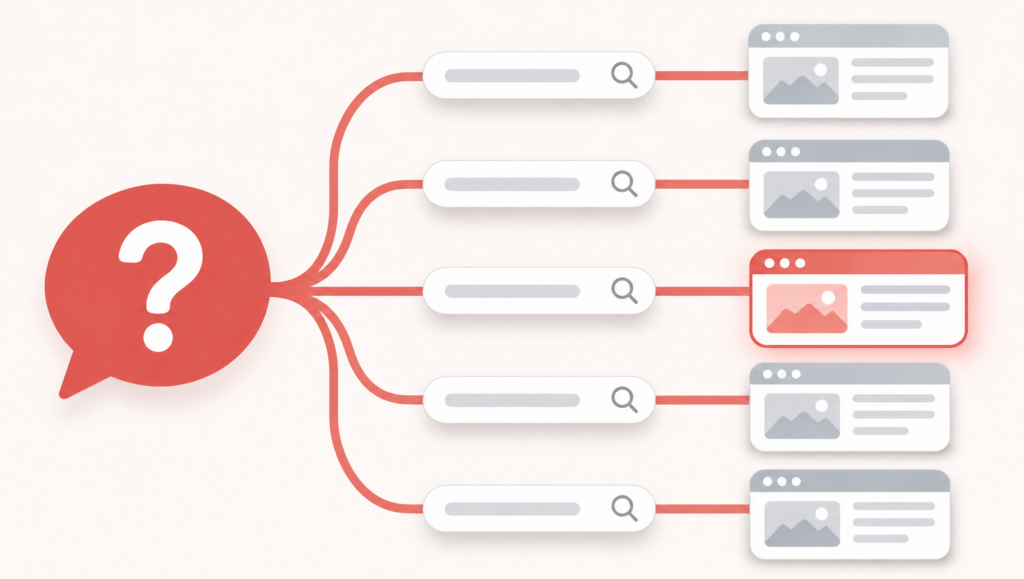
Query fan-out is how AI search engines answer one question by running many smaller searches behind the scenes. When a buyer asks Google AI Mode or ChatGPT to compare B2B software, the engine splits the prompt into sub-queries. It searches for pricing, integrations, security and alternatives, then cites the pages that answer those pieces. For B2B SaaS teams, that changes what it means to rank.
This guide explains what query fan-out is, how many sub-queries each engine runs and why ranking for the main term is no longer enough. It also shows how to map the sub-queries behind one buyer question, which page structure covers them and what fan-out data cannot tell you. It ends with a fan-out map template.
What is query fan-out?
Short answer: Query fan-out is the process where an AI search system turns one user question into several related searches, runs them together and combines the results into a single answer. Google describes it for AI Overviews and AI Mode, and studies show ChatGPT and other assistants do something similar when they search the web.
Think of a buyer asking which customer data platform fits a mid-sized SaaS company. The engine may search for definitions, top vendors, pricing, HubSpot integration and GDPR compliance before it writes a word. Each of those searches can pull in a different page. Your page can be cited for one sub-query even if it never ranked for the original question.
How many sub-queries does query fan-out create?
Short answer: It depends on the engine, the prompt and the method used to measure it. Tests in 2025 and 2026 found Google’s Gemini-based AI Mode running around ten sub-queries per prompt, while estimates for ChatGPT range from about two to more than seven. Treat every figure as a snapshot, not a constant.
| Engine | Sub-queries per prompt | Source and date |
|---|---|---|
| Google AI Mode (Gemini) | 10.7 on average, range 3 to 28 | Seer Interactive, 501 prompts via the Gemini API, November 2025 |
| ChatGPT | 2.1 | Peec AI, 5 million fan-out queries, April 2026 |
| ChatGPT | 7.61, up from 2.17 | Nectiv, about 4,000 prompts re-run, August 2026 |
| Perplexity | 1.4 | Peec AI, April 2026 |
The figures come from studies summarized by Surfer and others. Nectiv also found that ChatGPT used the site: operator in 64% of fan-out queries, which suggests it often searches inside specific vendor domains.
Why is ranking for the main query no longer enough?
Short answer: Because AI answers increasingly cite pages that rank for the sub-queries, not only for the original question. In Ahrefs’ March 2026 study, only 37.9% of AI Overview citations also ranked in the top 10 for the original query, down from 76.1% in July 2025.
Surfer studied 10,000 keywords and 33,000 fan-out queries. Pages ranking for the main query and at least one fan-out query were 161% more likely to be cited in AI Overviews than pages ranking for the main query alone. That is a correlation, not proof of cause, but it points in a clear direction: cover the questions behind the question.
How do you map query fan-out for one buyer question?
Short answer: Start with one real buyer prompt, list the sub-questions an engine would need to answer it, then check which of your pages answers each one. Use AI Mode, the Gemini API and your own sales calls to make the list realistic, and mark every gap.
- Write the prompt the way a buyer would, for example “best SOC 2 automation tool for a 200-person SaaS company”.
- List sub-questions by type: definition, shortlist, pricing, integrations, security, implementation time, alternatives and reviews.
- Run the prompt in AI Mode and note every cited source and the topic it covers.
- If your team uses the Gemini API with Google Search grounding, log the search queries the model generates.
- Add questions your sales team hears on calls, because buyers ask assistants the same things.
- Match each sub-question to one page on your site, or mark it as missing.
Repeat the map for your five most valuable buyer prompts. The gaps that appear in several maps are your priorities.
Which page structure covers fan-out queries?
Short answer: Give each important sub-question its own clear section, with a heading that matches how buyers ask it and an answer in the first lines. Keep sections self-contained, use real tables for comparisons and link related pages, so engines can retrieve exactly the passage that answers each sub-query.
- Headings that mirror sub-queries: “Does it integrate with HubSpot?” beats “Integrations”.
- Self-contained sections: name the product and the topic in the first sentence, as our guide to chunking for AI search explains.
- Dedicated pages for big sub-intents: pricing, security, integrations and comparisons each deserve their own URL.
- Fair comparison pages: engines often search for alternatives, so follow the rules in our guide to B2B comparison pages.
- Internal links: connect the hub page to every sub-question page and back.
What can’t query fan-out data tell you?
Short answer: Fan-out is not stable or fully visible. The same prompt can produce different sub-queries each time, engines rarely show them, and the studies measure correlation, not cause. Use fan-out maps to find content gaps, not to predict exactly which page will be cited for which prompt.
Google’s own documentation of fan-out is high level, and ChatGPT does not publish its sub-queries. Tools that claim to show exact fan-out queries are estimating them. Check results against your own Search Console generative AI report and prompt tests before changing many pages.
Query fan-out map template
Short answer: Use one sheet per buyer prompt. List each likely sub-question, its type, the page that answers it, whether that page is cited today and the next action. Review the map every quarter, because engines change how they fan out and competitors keep publishing.
| Buyer prompt | Sub-question | Type | Our page | Cited today? | Who is cited instead | Next action |
|---|---|---|---|---|---|---|
| Definition | ||||||
| Pricing | ||||||
| Integrations | ||||||
| Security | ||||||
| Alternatives | Create / update / leave |
Frequently asked questions about query fan-out
Does query fan-out apply to Google AI Overviews and AI Mode?
Yes. Google says its AI features may use query fan-out to search across subtopics before writing an answer. AI Mode appears to use it more heavily than AI Overviews. Both remain part of Google Search, so your pages still need to be indexed and eligible to show a snippet to be cited.
Can we see the exact fan-out queries for a prompt?
Not in AI Mode or ChatGPT. The Gemini API with Google Search grounding can return the search queries the model ran, which gives a useful approximation. Third-party tools estimate fan-out with their own methods. Treat all of these as samples, because the same prompt can produce different queries each time.
Should we create a separate page for every sub-query?
No. Create separate pages only for large sub-intents with real demand, such as pricing, security or a key integration. Smaller sub-questions work better as clear sections inside an existing page. Too many thin pages make your site harder to crawl and dilute authority.
How is query fan-out different from keyword clustering?
Keyword clustering groups searches people type. Query fan-out describes searches an AI system creates on the buyer’s behalf, often more specific and sometimes limited to certain domains. The two overlap, so start from your keyword clusters and add the sub-questions that buyers and engines ask during evaluation.
Next step
Pick your most valuable buyer prompt this week, build its fan-out map and fix the first gap. For the basics of Google’s AI features, see our guide to Google AI Overviews optimization. To see how Gemini picks its sources, read our guide on how to get cited by Gemini.
Want more practical guides on query fan-out and AI search? Browse the latest articles on the Blippu blog.